






How to Use Ram’s Uconnect 5 Navigation and Voice Commands in the 2026 Lineup
If you’ve ever tried to figure out a new infotainment system while already on the road, you know exactly how that goes. The good news is that Ram’s Uconnect 5 navigation is built to shrink that learning curve considerably. Whether this is your first Ram truck or you’re upgrading from an older model, the 2026 lineup delivers a noticeably sharper experience across every trim.
If you’re ready to explore your options, browse our new Ram lineup to see what’s currently available. And when you’re thinking about the path to ownership, we’re happy to walk you through our financing options as well.
What Uconnect 5 Navigation Brings to the 2026 Ram Lineup
Uconnect 5 is Ram’s fifth-generation infotainment platform, and it’s a genuine step forward in both responsiveness and feature depth. Touchscreen input response is up to 5x faster than previous Uconnect versions, with inputs registering as quickly as 0.05 seconds. In practice, that means fewer delays when you’re switching screens, launching apps, or punching in a destination. Wireless Apple CarPlay and Android Auto are both supported, so you’re not wrestling with a cable every time you climb in.
Navigation runs natively through TomTom, with real-time traffic data and dynamic rerouting built in. Over-the-air map updates download automatically over Wi-Fi while the truck is parked, so your maps stay current without any manual steps on your end. Voice commands are woven throughout the system, which makes managing your route without glancing down actually practical rather than just a talking point.
The 2026 Ram lineup offers multiple display options, and which one you get depends on your trim. Here’s how they compare:
| Feature | 8.4-Inch Uconnect 5 | 12-Inch Uconnect 5 | 14.5-Inch Uconnect 5 NAV |
| Screen Size | 8.4 inches | 12 inches | 14.5 inches (portrait orientation) |
| Ram 1500 Trim Availability | Tradesman, Express, Big Horn, Warlock | Laramie, Rebel, Limited, Limited Longhorn | Tungsten (standard); Laramie (available), Rebel (available), Limited (available), Limited Longhorn (available) |
| Navigation | TomTom-powered via Nav button in menu bar | TomTom-powered with expanded map view and integrated vehicle settings | Full-page TomTom map view; integrates with vehicle settings, climate, and towing pages |
| Map Views | 3D/2D views, pinch-to-zoom, drag gestures | 3D/2D views, pinch-to-zoom, drag gestures | 3D/2D views; superior route visibility due to display size |
| Customizable Menu Bar | Yes | Yes, with quick access icons | Yes, with quick Nav access icons |
Ram 1500 Uconnect 5: Display Configurations from Big Horn to Tungsten
The Ram 1500 offers two distinct display setups depending on where your trim falls in the lineup. Knowing which screen comes with your configuration matters when you’re comparing options.
8.4-Inch Touchscreen: Tradesman, Express, Big Horn, Warlock
The 8.4-inch display handles navigation, audio, climate, and phone functions cleanly, with TomTom navigation fully active and a customizable menu bar for your most-used features.
12-Inch Screen: Laramie, Rebel, Limited, Limited Longhorn (Standard)
A meaningful step up in size and clarity, the 12-inch screen gives you more room for the TomTom map and easier access to vehicle settings without changing the layout you’re used to.
14.5-Inch NAV Screen: Tungsten (Standard), Available on Laramie, Rebel, Limited, Limited Longhorn
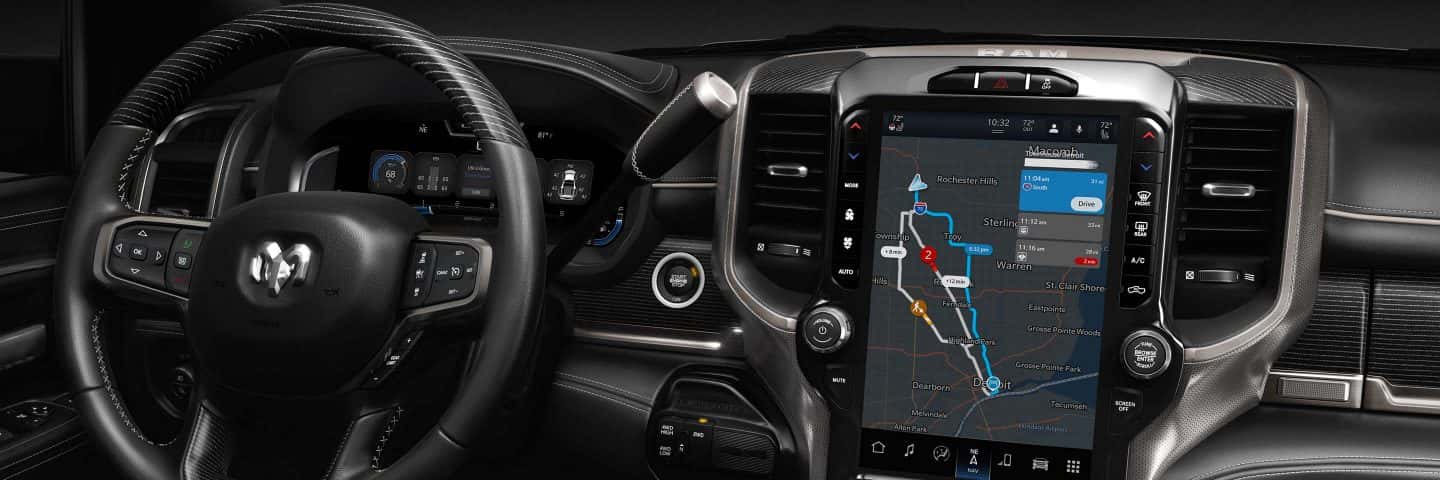
The 14.5-inch portrait-style display is the headline upgrade. The full-page TomTom map view is the standout difference, and the system ties navigation directly into vehicle settings, climate controls, and towing pages rather than burying them in separate menus.
Ram 2500 and 3500 HD: Uconnect 5 NAV Built for Heavy-Duty Haulers
The infotainment setup on Ram 2500 and 3500 HD trucks follows a similar structure to the 1500. The 8.4-inch display is standard on select trims and the 14.5-inch is available as an upgrade. The more meaningful difference for HD buyers is how the system integrates with the actual work the truck is designed to do.
Uconnect 5 on HD models includes dedicated trailer and towing pages, trailer camera views, and truck settings all accessible from the screen. For anyone hauling heavy loads regularly, the navigation becomes a genuinely practical tool. Dynamic rerouting accounts for trailer dimensions and load weight, helping you avoid low bridges or tight turns your setup can’t handle. That kind of routing logic isn’t a gimmick when you’re managing a serious haul.
Voice commands carry extra weight for HD drivers too. When you’re wearing work gloves or keeping both hands on the wheel through a tough stretch, managing navigation by voice without memorizing specific command phrases is worth a lot. If you’d like to talk through which HD configuration fits your work needs, reach out to our team and we’re happy to help.
How to Set Up Uconnect 5 Navigation and Stay Current with OTA Map Updates
Getting navigation running is pretty straightforward. Press the Navigation button on the menu bar to open the nav screen, then use the search keypad or voice input to enter a destination. The system accepts home addresses, work locations, and points of interest (POIs). When searching for POIs, you can browse by “whole map” or “near me” to narrow things down. Multiple route options are presented with ETA and distance estimates so you can pick before you pull out of the driveway.
For phone integration, go to Settings, then Phone/Bluetooth, add your device, enable wireless Apple CarPlay or Android Auto, and grant the necessary permissions. Once paired, voice commands can pull from your smartphone contacts as well.
Keeping maps current requires no effort on your part. OTA updates download automatically over Wi-Fi while the truck is parked and apply the latest TomTom road data without any user input. No USB drive to prepare, no file to hunt down and install manually. If you dealt with earlier Uconnect generations, you know how much of an improvement that is.
Real-World Voice Commands, TomTom Navigation Tips, and Dynamic Rerouting
Ram’s Uconnect 5 voice system handles natural language rather than rigid command phrases, which is a bigger deal than it sounds. You can say things like “Navigate to the nearest library,” “Find gas stations near me,” or “Drive to \[destination\]” and the system interprets the request in context. It can also search using entries from your smartphone contacts, so addresses you already have saved don’t need to be typed out again.
TomTom’s dynamic rerouting monitors live traffic data and suggests alternate paths when a slowdown or incident shows up. You can confirm a reroute by voice or by tapping the screen. Map views include 3D, 2D, and North-up orientations, and you can adjust the view or zoom level using pinch-to-zoom and drag gestures directly on the map.
For drivers navigating out of Prattville or across the River Region, that combination of live rerouting and voice-accessible navigation means you can manage the route without breaking focus on the road.
Experience Ram Uconnect 5 Navigation in Person at Stivers CDJR
See It in Action
Reading about a system is one thing. Sitting in the truck and actually using it is something else entirely. At Stivers Chrysler Dodge Jeep Ram in Prattville, you can walk through the full 2026 Ram lineup and see Uconnect 5 working firsthand. Our team knows the system well and can show you how navigation setup, voice commands, and towing integration work in practice across the different screen configurations.
Find Your Fit and Schedule a Drive
Whether you’re comparing the Uconnect displays on the Ram 1500 or looking at HD configurations for work, we’re here to help you find the right match without the pressure. Schedule a test drive and experience Ram’s Uconnect 5 navigation for yourself.
Images by OEM

0 comment(s) so far on How to Use Ram’s Uconnect 5 Navigation and Voice Commands in the 2026 Lineup